#1 Way to Support Your Favorite Streamers
Cultivate Your Community with Sounds, Text to Speech, Fullscreen Overlays, Videos, Emotes, Subathon Timers, Goals, Channel Points & More!


Trusted by 70,000+ streamers
Universal Integrations
Stream Anywhere, Earn Everywhere
Seamlessly integrate sound alerts into any streaming platform. Let viewers support you with Twitch Bits & Channel Points, or Blerp Beets. Every interaction helps build your community's unique meme culture while you earn.
Subathon Timers
The Only Timer You Need for Your Subathons
Run the most engaging subathon with our customizeable animated timer that seamlessly integrates with all Blerp rewards. Every meme, subscription (kick or twitch), and donation played will automatically add time.
Your Tailored Library
Craft Your Perfect Content Experience

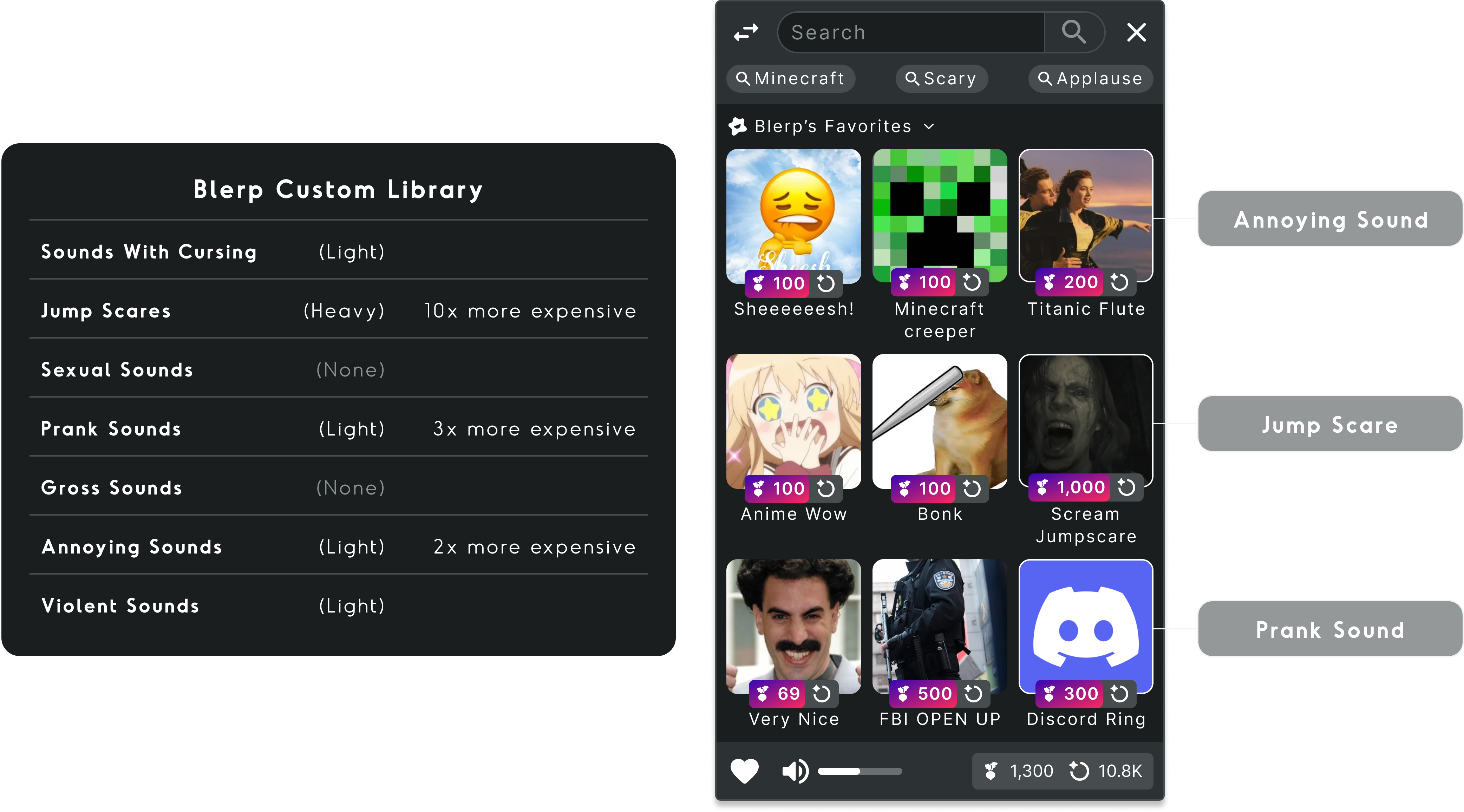
Handpicked, categorized, and ready for action. Our expansive sound library is crafted to match your vibe and help viewers create the perfect moments to support you. Not finding your sound? Browse over 1 million user-created sounds or create your own community classics!
Blerp WalkOn
Reward Viewers With WalkOn Sounds
Give your VIPs, subscribers, and supporters their own unique entrance sounds. Let them feel special every time they join your stream while creating memorable moments that strengthen your community bonds. Customize access by subscription tier.

Frequently Asked Questions
What streaming platforms is Blerp compatible with?
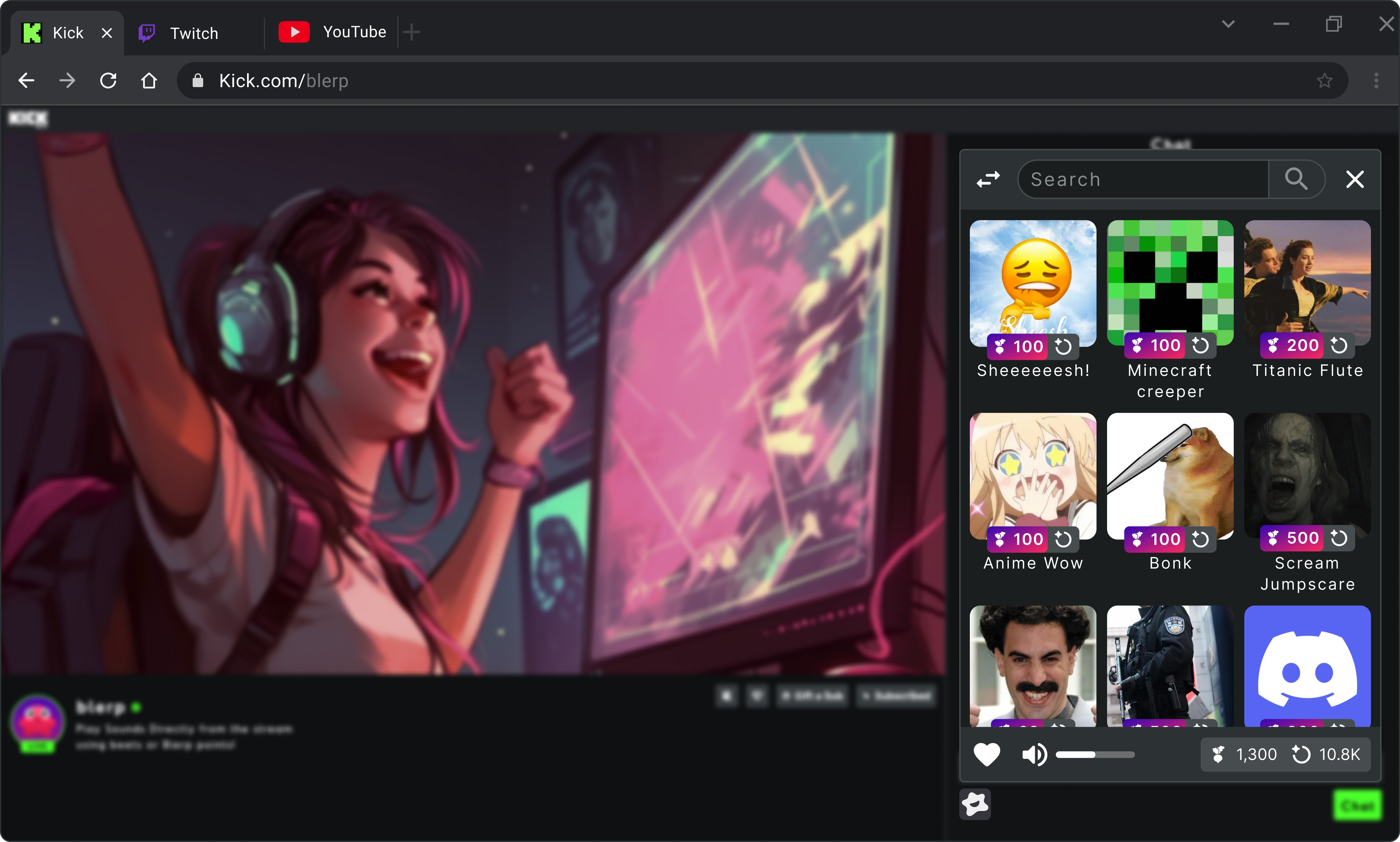
Blerp works on all streaming platforms to varying degrees. Viewers can play sounds directly from your stream on Twitch, Kick, and YouTube. For all other streaming platforms, your viewers can play sounds from your Blerp page.
How do my viewers use Blerp?
It's up to you to decide how your viewers use Blerp. Depending on where you stream, you can make any or all of the following methods available to your viewers:
The Universal Extension:
A Chrome extension for your viewers, similar to 7TV or BTTV. It works on Twitch, Kick and YouTube. Viewers spend Blerp Beets and Blerp Channel Points to play sounds.
The Blerp Twitch Extension:
Our directly integrated Twitch option. It supports Twitch Bits and works nicely for mobile viewers.
Twitch Channel Points:
Assign Blerp sounds to up to 50 Twitch Channel Point rewards or add a group of sounds to a reward to make it random.
Your Blerp Page:
A personal webpage similar to a donation page like Streamlabs or StreamElements. Viewers spend Blerp Beets to play sounds. It works on all streaming platforms, including TikTok, Rumble, Facebook, and more.
How do I control what sounds are available to my viewers?
You can add sounds one by one or by enabling Blerp's Curated Library, you can tailor thousands of sounds to your stream with just a few clicks. For categories including (but not limited to) "Sexual Sounds", "Jump Scares", and "Cursing", you can decide whether you want "all", "some", or "none" and adjust their prices as you see fit. You can always hand pick or upload your favorite sounds. If you still want more, give certain viewers access to the entire Blerp library of +1M sounds for endless surprises.
Can I keep my channel's sounds fresh without doing any work?
The Blerp Curated Library (see above) is constantly growing. We add new, trending and iconic sounds every day. Additionally, through the Blerp website you or your Editors can approve suggested sounds from your viewers. They can even suggest sounds they create! Finally, for your most trusted viewers you can give access to the entire Blerp library of +1M sounds.
Can I upload and create my own sounds?
Yes! It's easy for you, your viewers, or your editors to create Blerps. Upload audio files or use our creation tool to seamlessly create Blerps from Twitch or YouTube clips.
What are Support Packs and how do they help me earn more?
Support Packs are curated bundles of premium sounds that viewers can purchase to show extra support. When viewers buy Support Packs, you earn significantly more per interaction while giving your community exclusive, high-quality content. It's the perfect way for your biggest fans to contribute more while getting premium value in return.
How do I make money using Blerp?
You can make money every time a Blerp is redeemed on your stream. There are 2 ways to monetize: Blerp Beets and Twitch Bits.
Chat can buy Blerp Beets and use them to play a sound through the Universal Extension or your Blerp Page. You get 1 cent for every 1 Blerp Beet used on your channel and can cash out on the Blerp website. Beets are secured with PayPal infrastructure and are powered by Braintree.
On Twitch, viewers can buy Twitch Bits and use them on the Blerp Twitch Extension. Per Twitch extension policy, you get paid 0.8 cents for every 1 bit used on your channel through the extension and the extension developer (Blerp) gets paid 0.2 cents. Revenue from Bits is included in your Twitch paycheck and is visible in the extension section of your revenue window on Twitch.
Viewers can purchase Bits here and Beets here.
What's a Firesale and how does it work?
Firesale lets you instantly discount all your rewards with one click - perfect for special events, celebrations, or when you want to boost engagement. Set percentage discounts across your entire library and watch your chat go wild during hype moments. It's the easiest way to create excitement and reward your community during big streams.
How do Subathon Timers work with Blerp?
Our Subathon Timer is the most beautiful and functional timer available, featuring smooth animations and perfect integration with Blerp rewards. Every sound played, subscription, and donation can automatically add time to your subathon. The timer looks incredible on stream and keeps your audience engaged with real-time visual feedback on how their support extends your streaming marathon.
Is Blerp really free to use?
Yes! The core functionality of Blerp is free for everyone. We offer a subscription that unlocks premium features like Support Packs, advanced customization, Firesale controls, professional Subathon Timers, and the ability to download sounds.
How can I make Blerp match my brand?
Blerp offers complete visual customization to match your brand perfectly. Customize colors, fonts, overlay designs, alert animations, and even add your own video assets. From the Twitch Extension appearance to your personal Blerp page, everything can be tailored to create a cohesive brand experience that feels uniquely yours.
What are Fullscreen Overlays and Video Assets?
Take your stream alerts to the next level with cinematic fullscreen overlays and our library of premium video assets. Create movie-quality moments that completely transform your stream when sounds are played. Choose from our curated video library or upload your own custom assets for truly unique alerts that will have your viewers talking.
What can I do to make sure Blerps aren't spammed?
Use cooldowns or adjust prices to control how often sounds are played. If you just need a break, you can pause Blerp for your viewers and even set a timer for when it resumes. If a specific sound or user is a problem you can block them via our live history feed.
Can my editors manage Blerp for me?
Yes! Add your trusted community members as editors for your Blerp account. Blerp editors can manage your viewers, settings, available sounds, Support Packs, Firesale events, and more.
Does TTS Support more languages than English (US)?
Yes! Any voice model created using Blerp can support over 30 different languages including 🇬🇧 English (UK), 🇦🇺 English (Australia), 🇨🇦 English (Canada), 🇯🇵 Japanese, 🇨🇳 Chinese, 🇩🇪 German, 🇮🇳 Hindi, 🇫🇷 French (France), 🇨🇦 French (Canada), 🇰🇷 Korean, 🇧🇷 Portuguese (Brazil), 🇵🇹 Portuguese (Portugal), 🇮🇹 Italian, 🇪🇸 Spanish (Spain), 🇲🇽 Spanish (Mexico), 🇮🇩 Indonesian, 🇳🇱 Dutch, 🇹🇷 Turkish, 🇵🇭 Filipino, 🇵🇱 Polish, 🇸🇪 Swedish, 🇧🇬 Bulgarian, 🇷🇴 Romanian, 🇸🇦 Arabic (Saudi Arabia), 🇦🇪 Arabic (UAE), 🇨🇿 Czech, 🇬🇷 Greek, 🇫🇮 Finnish, 🇭🇷 Croatian, 🇲🇾 Malay, 🇸🇰 Slovak, 🇩🇰 Danish, 🇮🇳 Tamil, 🇺🇦 Ukrainian
Can I add emotes and GIF memes to my sounds?
Absolutely! You can enhance any sound you create by adding a GIF or emote to make it a Blerp. Additionally, you have the option to override existing GIFs in sounds that you've added to your streaming content manager!
Can I use my own voice as a TTS?
Yes you can train our model to clone your voice as a TTS, however this is only available to specific beta users at the moment. Please review our terms of service and text to speech TOS when creating voices. You will have the right to remove your data at any time. See TOS Here. Please join our Discord if you have more specific questions.
Is Blerp TTS really FREE too?
Yes! Blerp runs on a freemium model. We do have a community subscription for extra customization and extra features. But all public voices added are free to use with no subscription needed through all our integrations!
