Text-to-speech (TTS) is revolutionizing live streaming, turning viewer messages into hilarious, heartfelt, or epic AI-voiced moments that keep audiences hooked. As streaming platforms like Twitch, YouTube, Kick, and TikTok grow, TTS has surged in popularity, offering streamers a powerful way to boost engagement and unlock monetization through interactive alerts. Enter Blerp, the leading AI TTS solution, delivering free, customizable, and DMCA-safe features that make it easy for streamers to create unforgettable experiences. This guide explores how Blerp’s text-to-speech tools can elevate your streams to the next level.

**Meta Description** Elevate your streams with Blerp’s free AI text-to-speech (TTS) for Twitch YouTube Kick and TikTok. Learn how to set up DMCA-safe TTS alerts boost engagement and monetize with our ultimate guide! **Tags** text-to-speech for streaming Blerp AI TTS Twitch TTS setup DMCA-safe streaming AI voice alerts streaming engagement multi-platform streaming tools Twitch streaming tools monetize Twitch streams Blerp vs Tangia AI TTS comparison streamer engagement tips monetize TTS alerts Blerp viewer interaction Twitch extension issues how to set up Blerp TTS AI voice streaming guide
Ultimate Guide to Text-to-Speech for Streaming with Blerp: Boost Engagement in 2025
Danny
·
May 8, 2025
Why Use Text-to-Speech for Streaming?
Text-to-speech (TTS) is a game-changer for live streamers, transforming how audiences interact with your content. Here’s why TTS is a must-have for your streams:
- Engagement Boost: TTS lets viewers send personalized messages that are read aloud in AI voices, creating real-time interaction and strengthening your community. Whether it’s a heartfelt shoutout or a goofy quip, these moments keep viewers coming back.
- Monetization Potential: By tying TTS alerts to Twitch Bits, Channel Points, or Blerp Beets (where streamers earn 1 cent per Beet), you can turn viewer interactions into a revenue stream, rewarding engagement while boosting your income.
- Creative Freedom: TTS adds humor, personality, and viral potential with funny AI voices or perfectly timed messages. Imagine a dramatic movie quote or a silly meme read aloud at just the right moment—pure stream magic.
- Multi-Platform Appeal: TTS works seamlessly across Twitch, YouTube, Kick, TikTok, and more, allowing you to captivate diverse audiences and expand your reach across platforms.
- Community Insights: Streamers on X, like @tj_littlejohn, rave about TTS tools for creating dynamic, interactive streams that stand out, with many noting how these alerts spark unforgettable viewer moments.
By integrating TTS, you’re not just streaming—you’re building a lively, interactive experience that resonates with your audience.

What Makes Blerp the Best TTS Solution for Streamers?
Overview
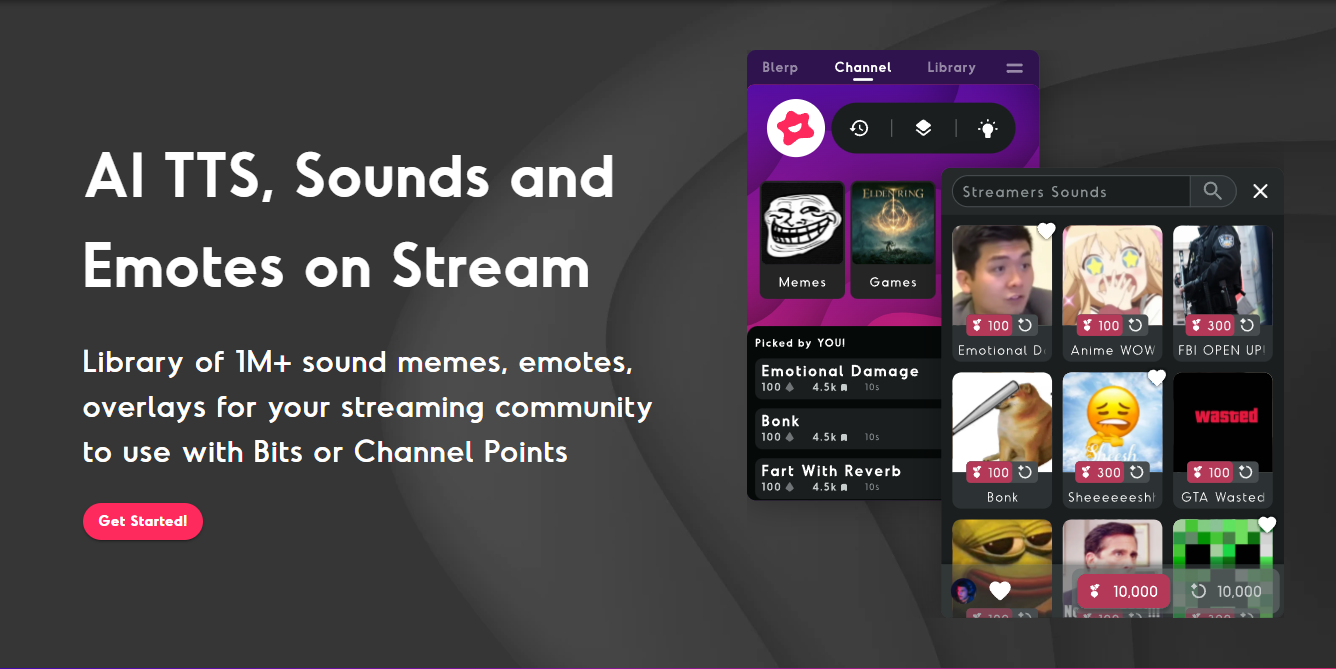
Blerp is a free, AI-powered text-to-speech (TTS) platform that redefines streaming interaction. With a library of over 1 million DMCA-safe sounds and support for Twitch, YouTube, Kick, TikTok, and more, Blerp empowers streamers to deliver engaging, safe, and versatile TTS experiences that captivate audiences across platforms.
Key Features
- Free AI TTS: Offers customizable voices in over 50 languages, allowing streamers to tailor alerts to their style, from comedic to cinematic, at no cost.
- Seamless Integration: Connects effortlessly with Twitch Bits, Channel Points, and Blerp Beets (earning streamers 1 cent per Beet), making monetization straightforward.
- Universal Extension: Supports multi-platform streaming with a single extension, offering a higher revenue share compared to Twitch-specific tools, ideal for creators on YouTube or TikTok.
- Robust Moderation Tools: Includes banned word filters, whitelists, and cooldowns to prevent spam or inappropriate messages, ensuring a safe stream environment.
- WalkOn Sounds and Subscriber Perks: Personalized sound alerts, like subscriber entrance themes, add a unique touch to viewer interactions.
DMCA Safety
Blerp prioritizes streamer safety, with only reviewed sounds guaranteed DMCA-safe. This protects your channel from copyright issues, giving you peace of mind while streaming.
Comparison
Unlike Tangia, which focuses heavily on visual overlays, or Streamlabs and StreamElements, which offer generic alert systems, Blerp stands out with its massive audio library, multi-platform versatility, and intuitive TTS setup. While Tangia excels in visuals and Streamlabs provides broad tools, Blerp’s focus on DMCA-safe sounds and free AI TTS makes it the go-to for audio-driven engagement.
Blerp’s combination of variety, safety, and ease of use positions it as the ultimate TTS solution for streamers looking to elevate their broadcasts.
Step-by-Step Guide to Setting Up Blerp AI TTS for Streaming
Setting up Blerp’s AI text-to-speech (TTS) is quick and easy, allowing you to add interactive voice alerts to your streams in minutes. Follow these steps to get started:
Step 1: Create a Blerp Account
- Visit blerp.com and sign up for a free account.
- Once registered, log in to access the Blerp Dashboard, your hub for managing TTS and other features.
Step 2: Install the Blerp Extension
- For Twitch: Navigate to the Twitch Creator Dashboard, search for the Blerp Twitch Extension, and add it to your channel.
- For Other Platforms (YouTube, Kick, TikTok): During onboarding, select the Universal Extension, which supports multi-platform streaming.
- Add a browser source to your streaming software (e.g., OBS, Streamlabs) using the extension’s URL provided in the Blerp Dashboard.
Step 3: Enable AI TTS
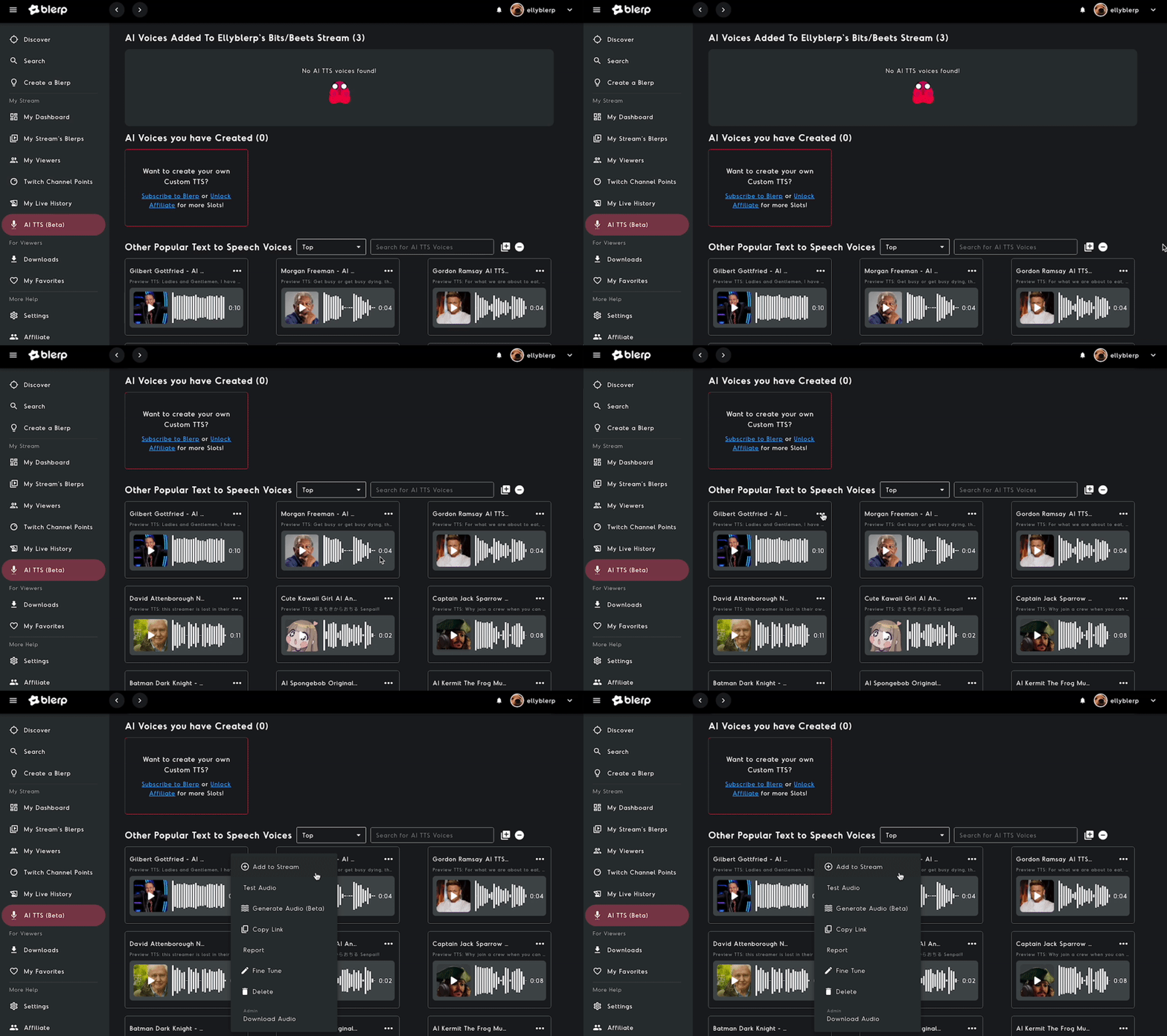
- In the Blerp Dashboard, go to the “AI TTS” tab and click “Turn On” to activate the feature.
- Browse a variety of AI voices with multi-language support (over 50 languages available), select your favorites, and add them to your extension.
Step 4: Customize TTS Settings
- Pricing: Set Bit or Beet prices for TTS alerts to monetize viewer interactions (Beets earn you 1 cent each).
- Volume and Limits: Adjust the volume and set character limits for messages to keep alerts concise.
- Whitelisted Viewers: Restrict TTS to trusted viewers for better control.
- Banned Words: Add specific terms to the banned word filter to block inappropriate messages.
- Cooldowns: Implement cooldown timers to prevent spam and maintain stream flow.
Step 5: Promote to Viewers
- Share your Universal Extension viewer link or QR code (found in the Dashboard) to let viewers access TTS without leaving your stream.
- Announce TTS availability in stream titles, descriptions, or with commands like “!blerp” to encourage participation.
Visual Aids
To make setup even easier, check out Blerp’s YouTube tutorials or include screenshots of the Blerp Dashboard’s “AI TTS” tab in your setup process. These visuals can guide you through each step and ensure a smooth experience.

Maximizing Engagement with Blerp AI TTS
Once your Blerp AI text-to-speech (TTS) is set up, it’s time to supercharge your streams with creative strategies, smart moderation, and monetization tricks to keep viewers engaged and your channel thriving.
Creative Tips
- Themed Voices: Match AI voices to your content for immersive experiences, like spooky voices for horror streams or robotic tones for sci-fi gaming, to amplify your stream’s vibe.
- Exclusive Voices: Offer premium TTS voices for subscribers or high-Bit donors, creating incentives for loyal viewers to support your channel.
- Viral Moments: Encourage funny or perfectly timed TTS messages, such as meme quotes or in-game reactions, to spark shareable, viral clips that boost your reach.
Moderation Strategies
- Whitelists: Restrict TTS to trusted viewers via whitelists to prevent trolling and maintain a positive stream environment.
- Banned Word Updates: Regularly update your banned word list in the Blerp Dashboard to filter out inappropriate or disruptive messages, ensuring a safe space for all.
- Cooldowns: Use cooldown timers to limit TTS frequency, keeping alerts manageable and preventing spam during high-energy streams.
Monetization Hacks
- Tiered Bit Prices: Set higher Bit prices for premium or exclusive voices to maximize earnings while rewarding engaged viewers.
- Promote Beets: On non-Twitch platforms like YouTube or Kick, encourage viewers to use Blerp Beets for TTS, where you keep 100% of the revenue (1 cent per Beet).
- Incentives: Highlight TTS as a donation perk in stream overlays or announcements to drive more viewer contributions.
Community Examples
Streamers like TenTan have leveraged Blerp’s TTS for viral success, using perfectly timed AI-voiced messages to create hilarious moments that resonate with viewers and rack up shares on platforms like TikTok. These real-world examples show how Blerp’s TTS can turn ordinary streams into unforgettable experiences.
Troubleshooting and Support
Running into issues with Blerp’s AI text-to-speech (TTS)? Here’s a quick guide to resolve common problems and access support to keep your streams running smoothly.
Common Issues
- TTS Not Playing: If TTS alerts aren’t playing, ensure the browser source is correctly added to your streaming software (e.g., OBS or Streamlabs) and check that the volume is adjusted in the Blerp Dashboard.
- Inappropriate Messages: To prevent unwanted content, update your banned word filters in the “AI TTS” tab or temporarily pause TTS via the Dashboard for more control.
- Extension Not Working: Verify you’re using the correct extension—Twitch Extension for Twitch streams or Universal Extension for YouTube, Kick, or TikTok—to match your platform.
Support Channels
- Blerp Discord: Join Blerp’s Discord server for real-time help from experts and community tips from fellow streamers.
- Blerp Blog: Explore detailed guides on Blerp’s blog, such as “How to Set Up AI TTS for Kick,” for step-by-step solutions and best practices.
Why Streamers Choose Blerp Over Competitors
Blerp stands out as the preferred choice for streamers seeking a robust AI text-to-speech (TTS) solution, offering unmatched versatility and features compared to competitors. Here’s why Blerp leads the pack:
Blerp vs. Tangia
Blerp boasts a massive library of over 1 million DMCA-safe sounds and seamless multi-platform support for Twitch, YouTube, Kick, TikTok, and more, making it ideal for streamers with diverse audiences. Tangia, while strong in visual overlays and interactive events like meme triggers, has a smaller sound library and focuses primarily on Twitch with Discord integration, limiting its cross-platform appeal.
Blerp vs. Streamlabs/StreamElements
Unlike Streamlabs and StreamElements, which offer generic alert systems with limited TTS customization, Blerp’s AI TTS delivers free, highly customizable voices in over 50 languages, paired with a DMCA-safe sound library. This ensures streamers can create unique, safe, and engaging audio experiences without copyright concerns, surpassing the basic alert functionality of competitors.
User Feedback
Streamers on X praise Blerp for its ease of use and engagement boost, with many noting how its sound memes and TTS create viral moments that grow their communities. However, some mention that effective moderation, such as setting banned word filters, requires initial setup to prevent inappropriate messages. Overall, Blerp’s intuitive interface and interactive features make it a streamer favorite.
Unique Selling Points
- Free Core TTS Features: Blerp offers robust AI TTS for free, with premium customization options available for $4.99/month, making it accessible for all streamers.
- Voice Cloning in Beta: Blerp’s beta voice cloning feature allows personalized TTS, with clear data removal rights for user control (currently limited to select users).
- Cross-Platform Versatility: The Universal Extension enables seamless TTS and sound alerts across Twitch, YouTube, Kick, TikTok, and more, unlike competitors tied to specific platforms.
Blerp’s combination of a vast sound library, free AI TTS, and multi-platform support makes it the top choice for streamers aiming to elevate engagement and monetization.
Conclusion
Blerp shines as the ultimate text-to-speech solution for streaming, offering free AI TTS, a massive DMCA-safe sound library, and unmatched cross-platform versatility via its Universal Extension. With features like customizable voices, robust moderation tools, and monetization through Bits and Beets, Blerp empowers streamers to create engaging, safe, and profitable streams. Sign up for Blerp’s free tier today, experiment with AI TTS, and join the Blerp Discord to share your experiences and connect with a vibrant streaming community!


